~/docs›Agents
Retros
A retro is a look back at your work with Claude, like a sprint retro with your agent. Claude reads your review feedback and your sessions since the last retro, and proposes changes to its setup (CLAUDE.md, skills, hooks). You decide. Claude applies what you validate, and nothing else.
The goal: fewer of the same comments, retro after retro.
What a retro looks at
You choose, at each retro, among three sources:
- Your reviews: the threads you left in VS Code. What did you have to ask for again and again?
- Your sessions with Claude: where you corrected it, interrupted it, or redid its work.
- An audit of your setup. Claude checks your
CLAUDE.mdfiles, skills and commands for rules that are outdated, contradict each other or say the same thing twice. It only reads: nothing changes at this step.
Running a retro
You need the silykat plugin in Claude Code, and Claude Code 2.1.283 or later for the audit.
- In a Claude Code session started in your project, type
/silykat:retro(or ask for a retro). - Choose the period. Since the last retro (the last 7 days for a first one), the last 30 days, everything, or a date of your own. Each choice shows how many threads and sessions it covers.
- Choose the sources. At your first retro, Claude asks how you want each source for this project: always, never, or ask each time. It remembers your answers.
- Check the recap. It says what will run, and how long it should take. Start, or leave a source out.
- Wait for the analysis. It runs on its own and can take a while. You can step away.
- Discuss the proposals, one at a time (see below).
- Each change is applied as soon as you validate it, while the discussion goes on. The retro ends with the list of files changed.
What you decide
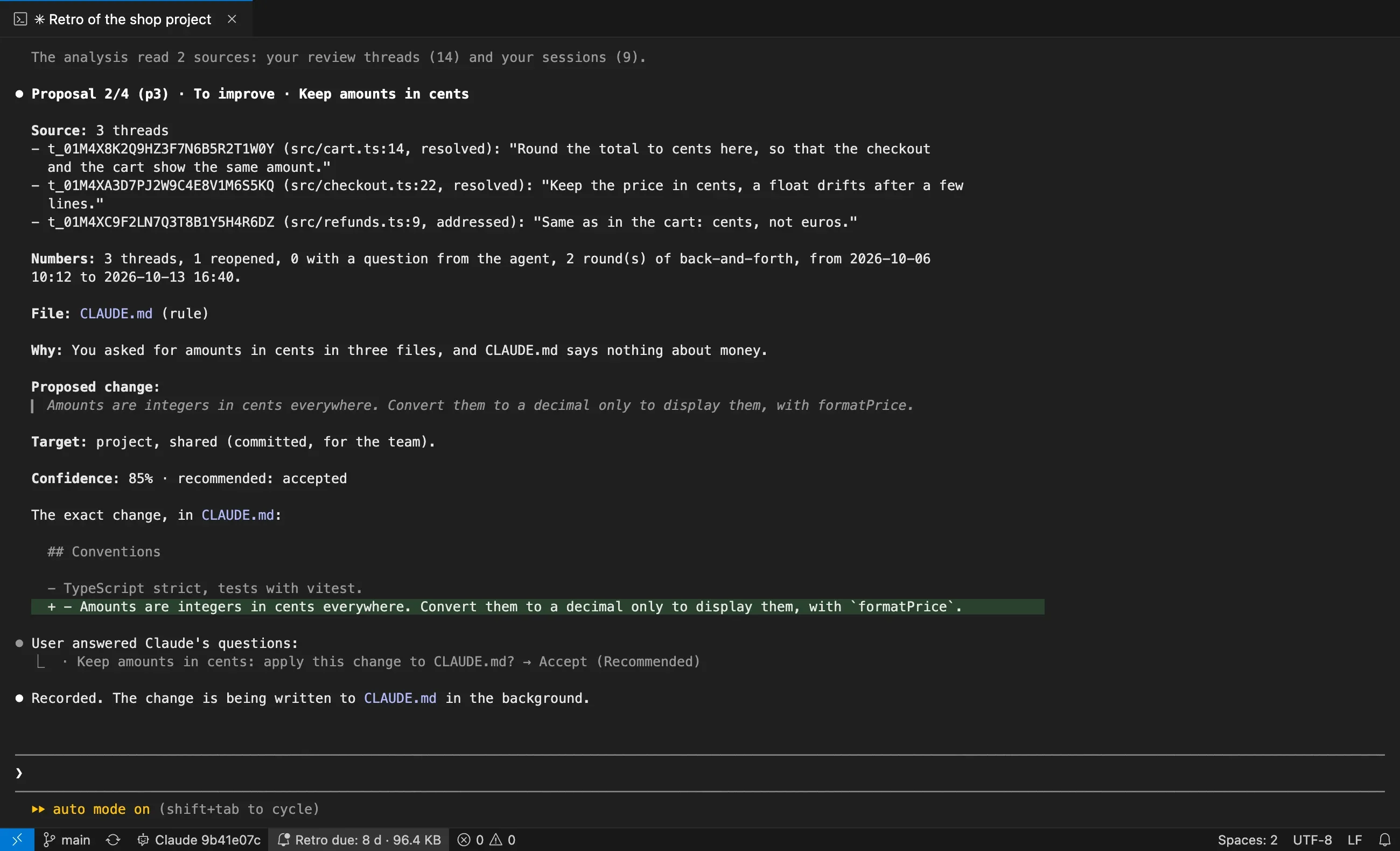
Claude sorts its proposals in three columns: To keep, To remove and To improve. Each one cites its evidence: the threads and the moments of your sessions it comes from.
Before the proposals, Claude also shows what recurs across your sessions (patterns, frictions, rituals). You may find leads of your own there, such as a task to automate.
Then, for each proposal, you see the exact change (a diff of the file, or the whole new file) and you choose:
- Accept it;
- Modify it: Claude shows the new version before writing anything;
- Exclude it: it comes back only if new feedback raises it;
- Change where it goes: shared with your team (the repository’s
CLAUDE.mdor.claude/), personal to this project (CLAUDE.local.md), or for you everywhere (~/.claude/).
You can also just talk it through.
When the audit finds a skill, command or sub-agent that nobody used, Claude asks whether to remove it, fix it, or keep it as is.
The next retro checks the last one
From your second retro on:
- Claude recalls what you decided last time, and asks whether you want to change anything in the retro itself (what it looks at, its level of detail, subjects to ignore). Your wishes apply from then on.
- For each change you adopted, the retro measures whether the same feedback stopped, decreased, or did not decrease. A change that did not help comes back as a proposal to revise it.
When to run a retro
About once a week. With too little feedback there is not much to learn. With too much, the analysis reads it less finely.
silykat reminds you:
- In the VS Code status bar, for example
Retro: 6 d · 640.0 KB(days and size of the threads since the last retro). It turns intoRetro due: 8 d · 1.2 MBwhen a retro is due. Click it to see how to run one. - In Claude’s first reply of a new session, once: Claude says a retro is due and suggests
/silykat:retro. It never starts one on its own.
A retro is due after 7 days, or sooner once the threads weigh 1 MB, and never later than 25 days. You can change these thresholds in Settings.
The Jev key (optional)
Jev can sort your threads by kind of feedback, faster and cheaper than a model of your subscription. Without a key, Claude does it.
At your first retro, Claude offers to set it up. It gives you a command to run in your own terminal, which asks for the key without showing it and saves it in a file only you can read. The key never goes through the conversation.
This is the only time silykat goes online: during a retro, and only if you set up a key. See Data and privacy.
Good to know
- Cost: a retro uses your Claude Code subscription (or API key), like a session. The recap gives the estimated time, and the end of the retro says what it took.
- Your project is the folder where you start Claude Code: its subfolders, every repository in it, and their git worktrees.
- Past retros are recorded in
.silykat/retros/. Ask Claude to show them, or runslk retro listandslk retro show <id>. - Claude Code only, for now. A retro reads conversations on the machine where they ran.
For the details of each step (sources, reports on your sessions, measures, guard rails, costs), see How a retro works.